AI renders and a material schedule in one project
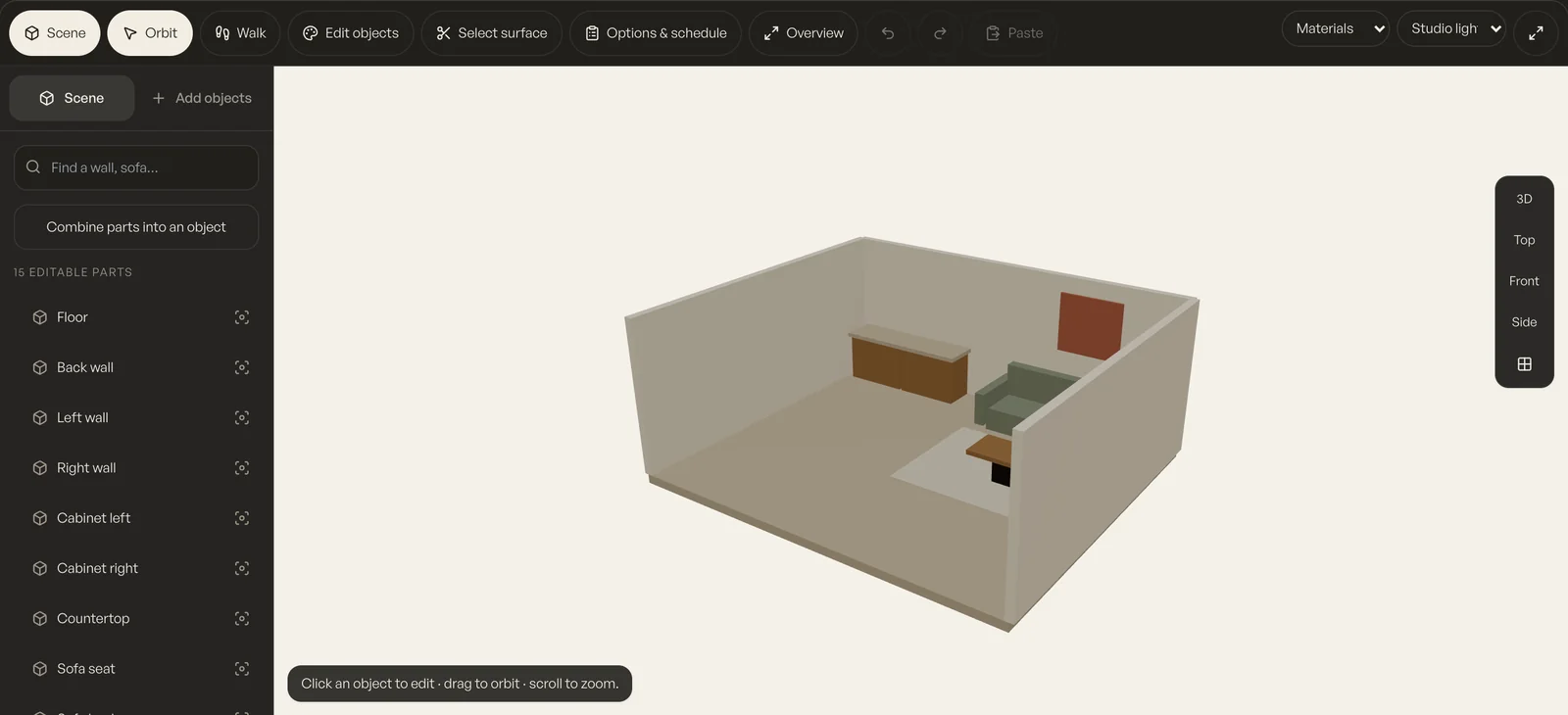
ArchiStudio is a browser-based AI studio for interior designers and fit-out studios, made by iSkale Group in Dubai. One project holds your 3D model, the finish options you try on it, a material schedule for its objects and the AI renders you make of the same views.
Open your own model or build a simple room in the browser, and everything after that stays in the same project.
The short answer
- AI renders
- Yes. Render any view of your model, a sketch, a floor plan or a screenshot from your modelling tool. Every result has a compare slider against its reference.
- Material schedule
- Yes. Every object in the model gets a row for its material, supplier, product code, quantity, price and lead time. Export it as CSV or print it to PDF.
- Quantities
- You enter them, with a note on where each figure came from. ArchiStudio does not measure quantities from the model.
- Products
- Your own suppliers and prices. Beyond three example products, ArchiStudio has no product catalogue; on Pro and above you keep your own material library and pick from it.
- Client review
- Send images and clips as one link. The client approves each view or asks for changes on a phone, with no account.
How one project runs
Open the model
Import GLB, glTF, FBX, OBJ or STL files up to 100 MB, with textures in a ZIP where needed, and IFC files through their own import. No model yet? The room builder makes an editable room from a width, a depth and a ceiling height.
Try finishes and keep them as options
Pick an object, change its finish and save the scheme as a named option. One model holds up to 12 options, and you can compare any two of them object by object.
Fill in the schedule
Each object's row takes the product, the supplier, the code, a quantity with its basis, a unit price with its currency and date, the lead time and links to the product page and technical sheet. The row lists what is still missing, and an unknown price is left out of the subtotal and counted as unpriced.
Render the same view
Frame a view and choose Render this view. ArchiStudio saves that view to the project and opens Sketch to Render with it as the reference. Strict adherence is on by default: it asks the engine to keep the geometry, openings and camera, and the compare button lets you check the result against the view.
Share and export
Export the schedule as CSV or print it to PDF, and send your chosen images and clips to the client as one approval link they open on a phone.
What stays with you
- Quantities and prices. They are your figures, with a date and a source for each.
- Supplier checks. Confirm stock, lead time and the quote with the supplier, and record the date you checked.
- Physical samples. A colour on screen is a design reference; check a real sample under the room's light before you specify it.
- Drawings for construction. ArchiStudio's outputs are concept visuals and design records; construction drawings stay with your CAD or BIM tool.
What it costs
Free
Free
- 74 welcome credits for 11 days, no card needed
- 2K renders and 5-second clips
- The 3D workspace, options and schedule
Starter
$59 a month
- 1,000 AI credits a month
- 2K renders and 10-second clips
- Or $528 billed yearly
Pro
$149 a month
- 2,800 AI credits a month
- 4K renders and 15-second clips
- Your own material library
- Or $1,344 billed yearly
Questions
Can ArchiStudio make a material schedule from a 3D model?
Yes. When you open a model, each object in it gets a row in the schedule. You fill in the material, supplier, code, quantity and price, then export the schedule as CSV or print it to PDF. You enter the quantities; ArchiStudio does not measure them from the model.
Which 3D files can I open?
You can open GLB, glTF, FBX, OBJ or STL files up to 100 MB, with textures in a ZIP where needed, and IFC files through their own import. The free sample room at archistudio.space/demo opens GLB and FBX files without an account.
Will an AI render keep my design?
Changing a finish on a model object keeps its geometry. An AI render is a generated interpretation: strict adherence asks the engine to keep the geometry, openings and camera but cannot guarantee it, so check every result with the compare button, which lays it over its reference with a slider.
Does ArchiStudio have a product catalogue?
No. It shows three example products from UAE manufacturers, and everything else in the schedule is your own: products, suppliers and prices. On Pro and above you can save your own material library and pick from it when you fill in a row.
Can my client approve the renders?
Yes. From the Library, send a set of images and clips as one link; from the Studio, send one result. Your client opens the link on a phone without an account and approves each view or asks for changes with a note, and the decision shows on the view in your Library. In the Library you choose how long a link lasts and whether it allows downloads, and you can close any link at any time.
How much does ArchiStudio cost?
Free gives 74 welcome credits for 11 days, with no card needed. Starter is $59 a month with 1,000 AI credits, and Pro is $149 a month with 2,800 credits, 4K renders and 15-second clips. Billed yearly, they are $528 and $1,344 a year. Seat bundles for teams and every limit are on the pricing page.